> For the complete documentation index, see [llms.txt](https://vector-privacy.gitbook.io/vector-privacy/llms.txt). Markdown versions of documentation pages are available by appending `.md` to page URLs; this page is available as [Markdown](https://vector-privacy.gitbook.io/vector-privacy/vector-messenger/features/contacts.md).
# Add Contacts
Add Vector Users and Start Chatting Privately
{% hint style="info" %}
Future versions will include a username system making it easier to find and add contacts.
{% endhint %}
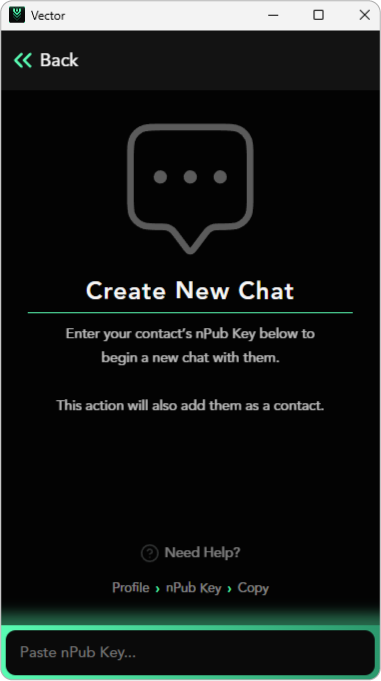
As mentioned on the [last page](/vector-privacy/vector-messenger/features/account.md), Vector Messenger uses Nostr public addresses as identifiers for accounts to easily find and add trusted contacts. If you want to add a contact, you can visit the "Chat" tab on the bottom navigation bar and click "New Chat". This will prompt you to input the Nostr public address or `npub` of the user you are looking to chat with. Make sure you copy and paste the entirety of their 64-characters Nostr public key. Remember, Nostr public keys begin with `npub`.
New Chat (Add Contact)
## Add Contacts
Just as easily as you can add contacts, you can also rename them, or mute or block them. Renaming a contact works similarly to adding a nickname, letting you use an alias for privacy and safety purposes. Muting a user stops in-app notifications when you receive a new message from them. Blocked users appear under the Privacy section in your Settings.
### Sharing Contacts
There are two ways to simply share contacts in Vector. You can either copy the `npub` of the user or copy their full Profile URL and once pasting into a chat it will show as an embedded message for users to view. Click Open and it will take you to the user's profile, where you can decide to message, mute, block, share, and change their nickname.
### Profile Share URL
As mentioned on the Account & Profile page, each user has their own custom invite URL, which can easily be shared on social media or privately with your intended contact. Once shared, accepting the invite is as simple as clicking Accept Invite, which brings up that user's profile. [Learn more](https://vector-privacy.gitbook.io/vector-privacy/vector-messenger/features/pages/rvMjx2v9cl5Nrs1BQOk0#share-profilehttps:/app.gitbook.com/o/mMwsare7P7aUyIPGVXbv/s/3LGA7a9Evs77SLg3yRNI/~/edit/~/changes/163/features/account#share-profile)